
Matomo (Piwik) was recently released with an improved mechanism for handling javascript and css file inclusions. The main idea was to merge javascript and css files into two files. You can find out more about the way the idea was brought and have a look at discussions around it within the trac ticket: http://developer.matomo.org/trac/ticket/660.
In this blog entry we will review the new mechanism according to two points of view: the Matomo user and the Matomo developer.
Making Matomo UI faster for its users
Here is an overview of the improvements. How figures have been obtained is explained later on.
Improvement summary for CSS files
| Access Type | Download Size | Download Time |
|---|---|---|
| First Access | -15% | -80% |
| Returning Visit | NA | -80% |
Improvement summary for JS files
| Access Type | Download Size | Download Time |
|---|---|---|
| First Access | -10% | -45% |
| Returning Visit | NA | -55% |
The new mechanism has been designed with the main purpose of making the UI faster and more responsive so users have a great time using Matomo. The goal has been achieved by reducing the amount of http requests for javascript and css files from 32 and 14 respectively to two. In addition, both merged CSS and JS files have been minified.
In order to fully appreciate how much time we gain, we used the firefox extension firebug to have a detailed look at http requests before and after the mechanism has been applied. We will compare results both with the browser cache disabled and enabled. Disabling the browser cache simulates a first access to Matomo, enabling it simulates returning visits.
HTTP requests are captured while accessing Matomo demo dashboard (demo.matomo.cloud). From my computer, based in Paris area, request durations were fluctuating quite noticeably. A series of requests has been made in order to evaluate duration averages. Results taken from those measurements can only be approximates.
1) CSS files comparison, first access to Matomo
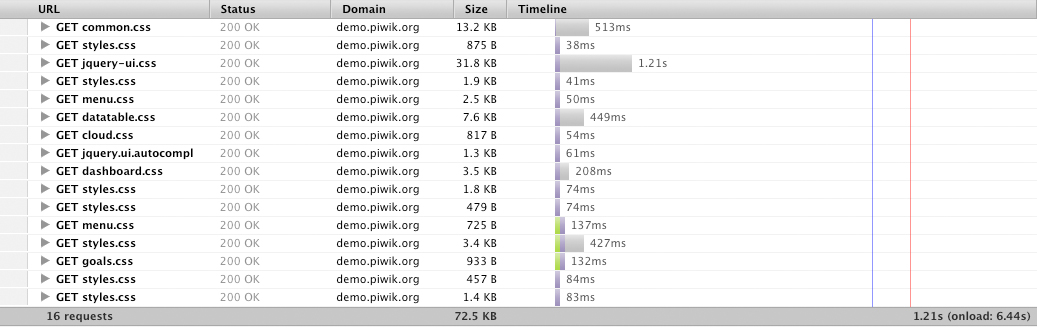
CSS files – Before optimization

CSS files – After optimization
Results: A gain is noticeable both in download size (minus 15%) and in download time (minus 80%).
2) JS files comparison, first access to Matomo
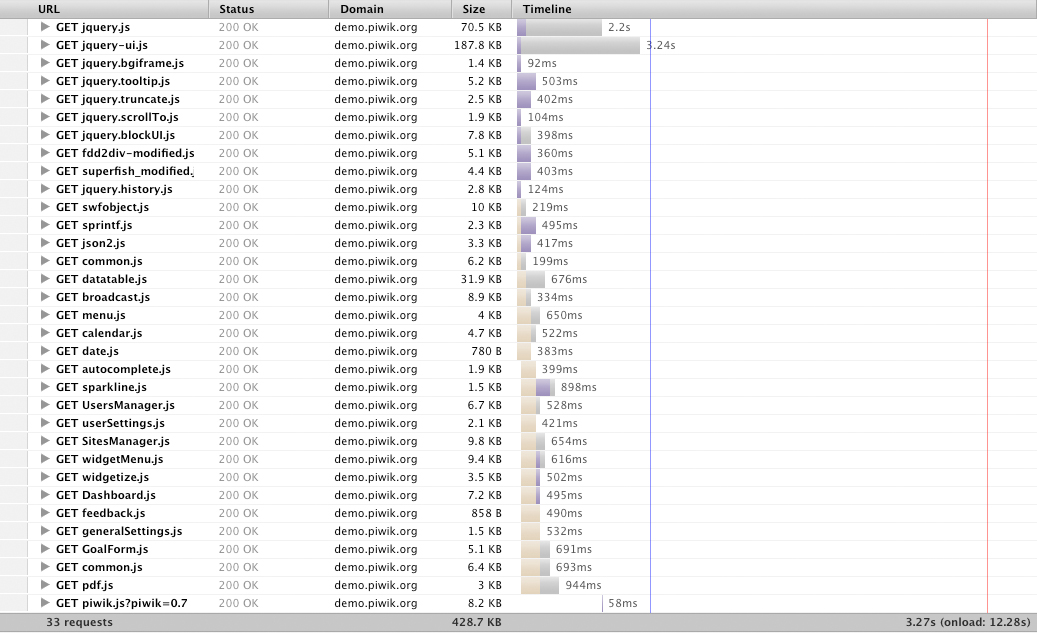
JS files – Before optimization

JS files – After optimization
Results: A gain is noticeable both in download size (minus 10%) and in download time (minus 45%).
3) CSS files comparison, returning visit to Matomo
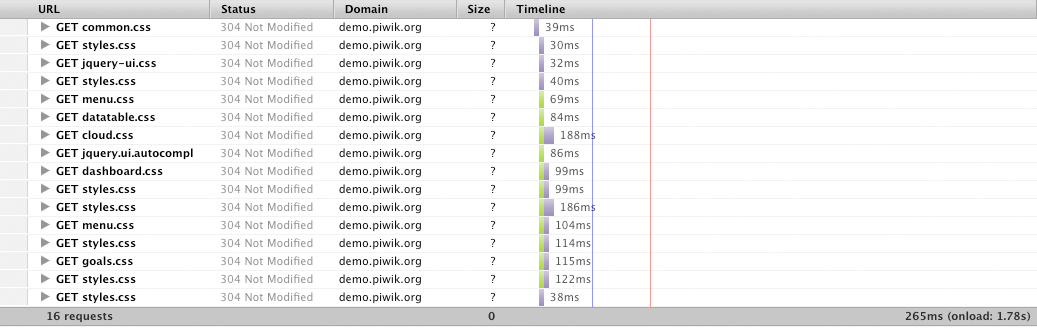
CSS files – Before optimization

CSS files – After optimization
Results: The downloading time is reduced by 80%.
4) JS files comparison, returning visit to Matomo
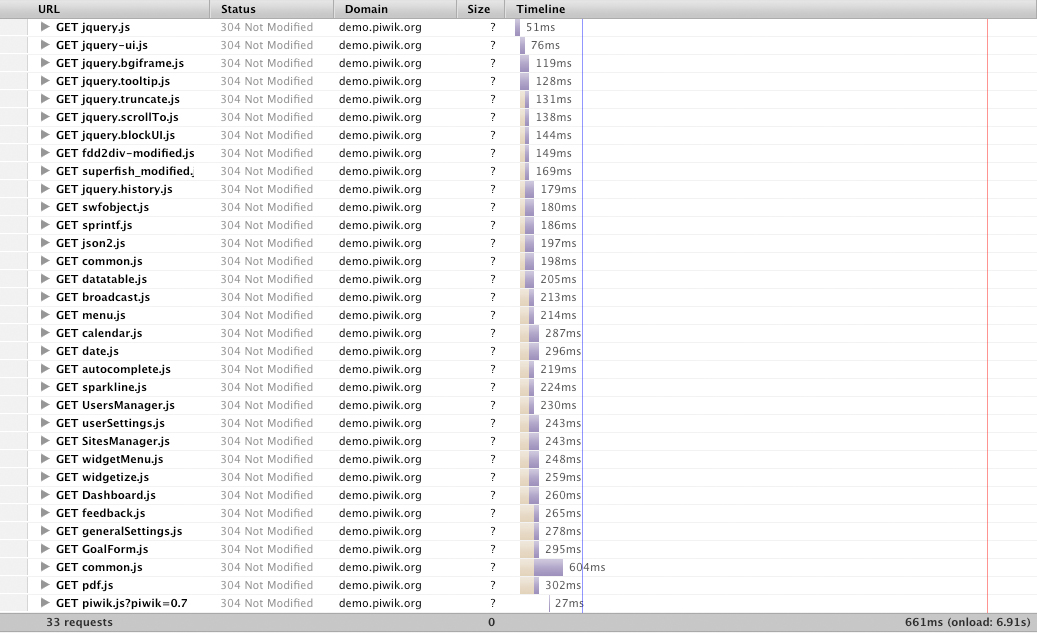
JS files – Before optimization

JS files – After optimization
Results: The downloading time is reduced by 55%.
Those results clearly show conclusive improvements in handling JS and CSS files and in making Matomo a more enjoyable experience. The last part of the post is about what has changed for Matomo developers.
Making Asset Management a breeze for Matomo developers
With the new mechanism in place, Matomo developers benefits from a new approach in dealing with their JS and CSS files needs. Asset management is now framework oriented and fits nicely with the overall idea of Matomo being a Web Analytic framework.
JS and CSS files used to be included manually within smarty templates. Lets have a look at the VisitsSummary plugin in Matomo 0.6.3:
<script type="text/javascript" src="plugins/CoreHome/templates/sparkline.js"></script>
See https://github.com/piwik/piwik/blob/0.6.3/plugins/VisitsSummary/templates/index.tpl#L1
It is no longer the case. Asset files are now included using the well-established event hook feature of Matomo.
Here is a 4 step how-to using the CoreHome plugin of Matomo 0.8:
1) Disable file merging and minifying
The new mechanism can work under two modes:
- Mode 1 (default mode), JS and CSS files are merged and minified into 2 files:
- Mode 2 (development mode): JS and CSS files are included individually without being merged and without being minified.
The first mode is to be used in a production environment. It is designed to offer the best performances.
The latter mode has to be used when adding, removing and modifying JS/CSS files. Changes will not be taken into account if the development mode is not activated. This mode has been designed to ease the debugging process. In this mode, each file is included individually to find javascript or css bugs more easily.
To activate the development mode, you can set disable_merged_assets=1 under the section [Development] in your config/config.ini.php.
See https://github.com/piwik/piwik/blob/0.8/config/global.ini.php#L56
You are now ready to add/remove/modify JS and CSS files.
2) Create two public initialization methods in your Piwik_Plugin class with the following signature
 function getCssFiles( $notification )
 {
}
See https://github.com/piwik/piwik/blob/0.8/plugins/CoreHome/CoreHome.php#L37
function getJsFiles( $notification )
{
}
See https://github.com/piwik/piwik/blob/0.8/plugins/CoreHome/CoreHome.php#L50
3) Declare the files to include using the following example
function getCssFiles( $notification )
{
$cssFiles = &$notification->getNotificationObject();
$cssFiles[] = "themes/default/common.css";
$cssFiles[] = "libs/jquery/themes/base/jquery-ui.css";
$cssFiles[] = "plugins/CoreHome/templates/styles.css";
$cssFiles[] = "plugins/CoreHome/templates/menu.css";
$cssFiles[] = "plugins/CoreHome/templates/datatable.css";
$cssFiles[] = "plugins/CoreHome/templates/cloud.css";
$cssFiles[] = "plugins/CoreHome/templates/jquery.ui.autocomplete.css";
}
See https://github.com/piwik/piwik/blob/0.8/plugins/CoreHome/CoreHome.php#L37
4) Hook the initialization methods to the correct events
function getListHooksRegistered()
{
return array(
'AssetManager.getCssFiles' => 'getCssFiles',
'AssetManager.getJsFiles' => 'getJsFiles'
);
}
See https://github.com/piwik/piwik/blob/0.8/plugins/CoreHome/CoreHome.php#L29
When the user visits Matomo UI, the Asset manager will emit the event ‘AssetManager.getCssFiles’ and ‘AssetManager.getJsFiles’. Each plugin then hooks on this event, and adds its own JS/CSS files to the list of files to merge. AssetManager then uses CSSMin and JSMin library to generate the minified files.
We hope this post serves as a good overview of how Matomo UI has been made faster. There is always room for improvement, feel free to add comments with suggestions. We are always happy when Matomo evolves thanks to the community!


