May '10

17

Posted by

in Community, Development

Comments: 58 Comments

Piwik user interface new design: Give your feedback!

UPDATE: New design has been released in Piwik!!!

click here for more information

Over the last 2 years, the Piwik User Interface has not changed much in terms of design.

We are now excited to announce that the time has come to give Piwik a makeover – a new and improved look and feel designed to meet the following objectives:

  • The new design should make Piwik more appealing and give it a more modern and professional touch
  • The new design should fix the issues with the current UI
    Some features are hard to use in Piwik. For example, the calendar and period selector is confusing and the website selector doesn’t scale well with hundreds of websites.

With these objectives in mind, Marcin Galecki has been working hard alongside the Piwik team on mock-ups of the design. These mock-ups haven’t yet been implemented, as this is still a work in progress and your feedback is important to us.

Note: click on the images to view them full size.

Dashboard


The dashboard mockup displays most new changes on the design:

  • New menu
  • New controller’s style used for the Calendar, Add a Widget
  • New style for the website selector and language selector
  • New style for widgets: colors, the footer, and tables scrolling to the right when there is too much data to display. We tried to improve the widgets’ footer to make it easier to access the other reports that Piwik provides: Advanced view to show all columns, ‘Goals’ view to see conversions for each segment.

Example ‘Referers > Overview’ report
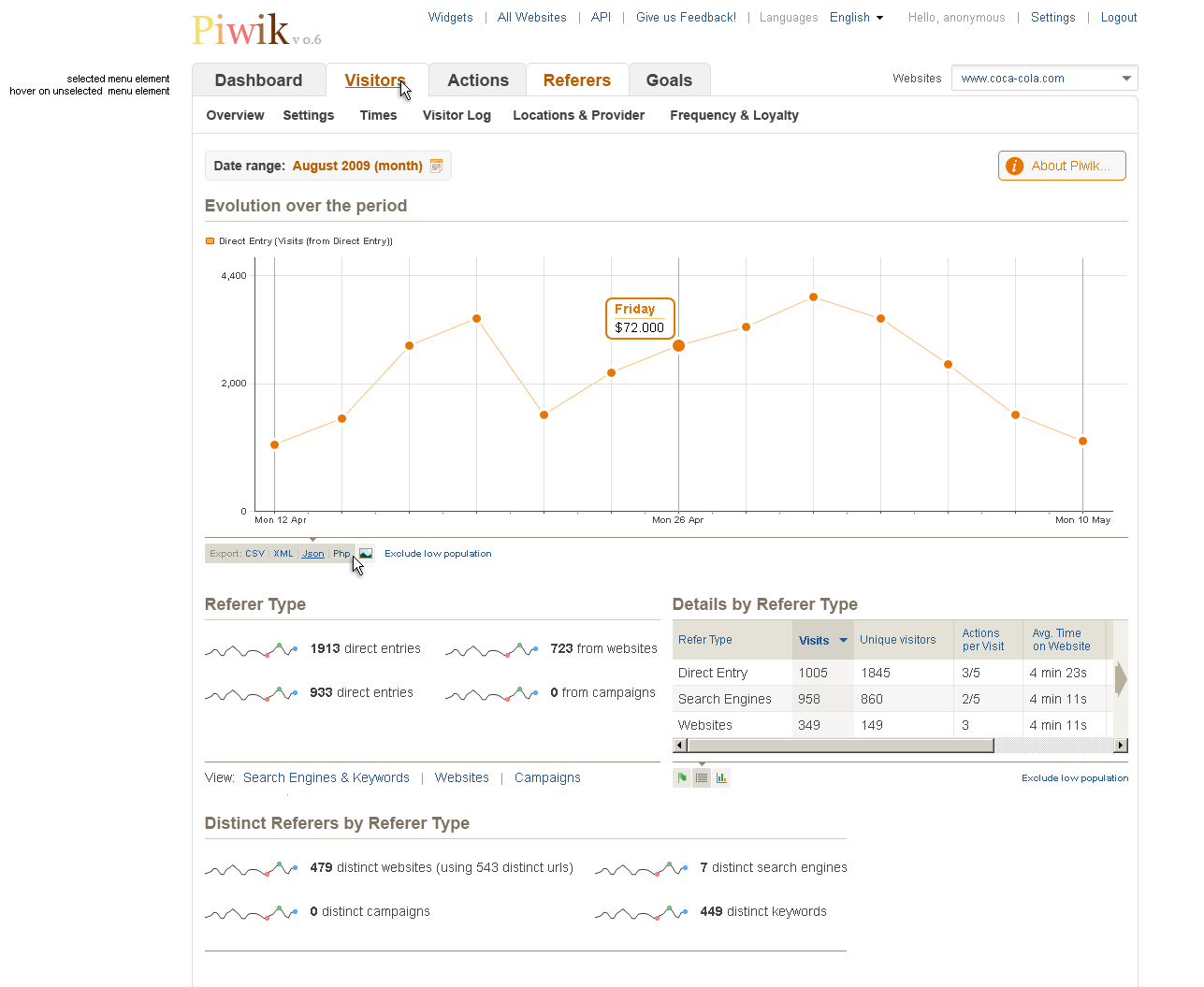
This is an example of the “Referers Overview” report using the new styles.

Pages report
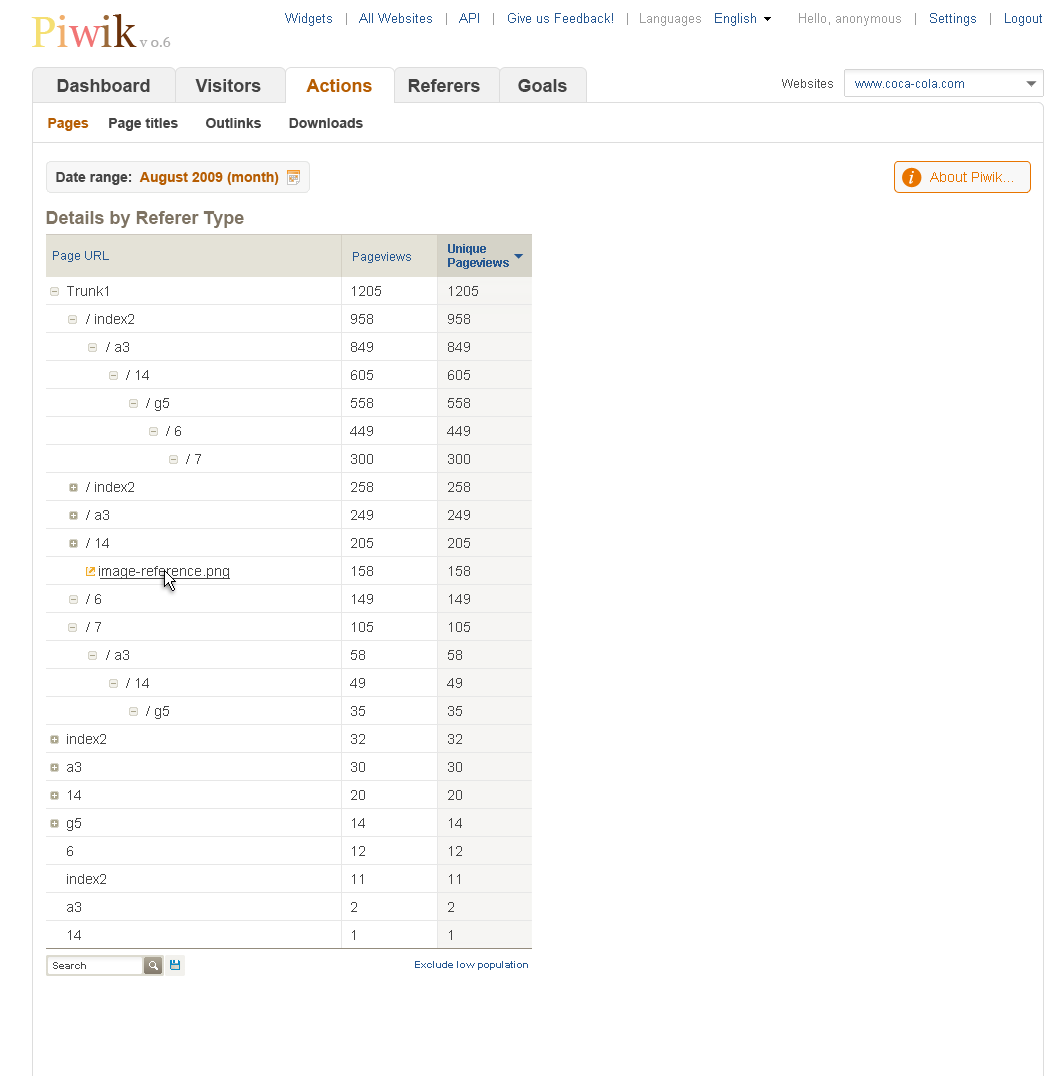
This mockup shows the style of the expandable data table, used in the Pages URLs and Page titles reports.

About Piwik message

By default, the message displayed would be short and sweet, and on Hover would display the full message.

Add a Widget selector
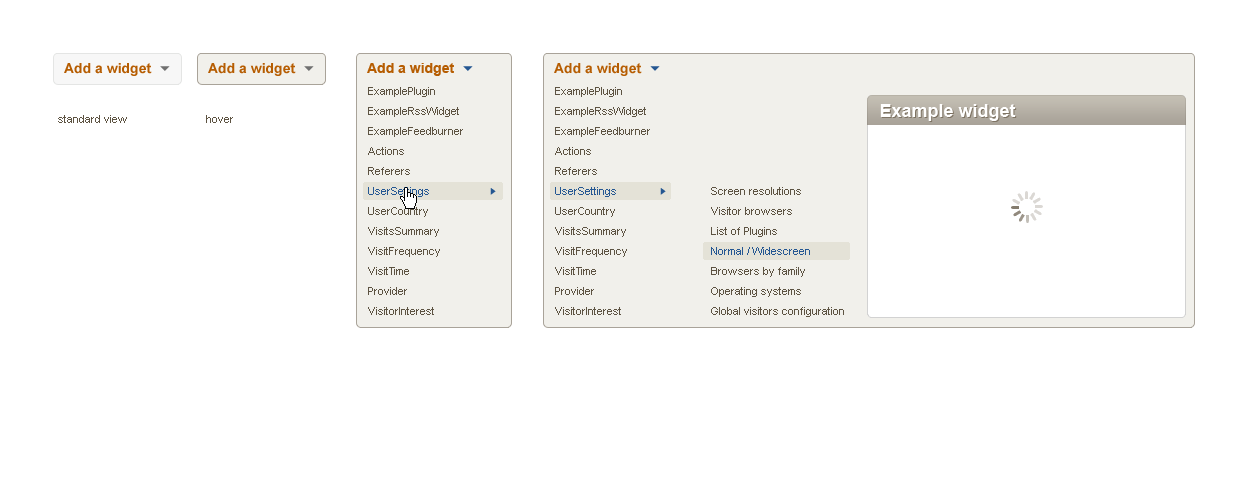
The “Add a widget” tool is now better integrated in the UI and re-uses the same styles as other selectors.

Website selector

The website selector currently does not scale if Piwik manages hundreds or thousands of websites and this new design would fix this usability issue. Only the first 10 websites (or 10 most recently used) would be displayed, and you could “Search” for websites (matching names and URLs).

Calendar
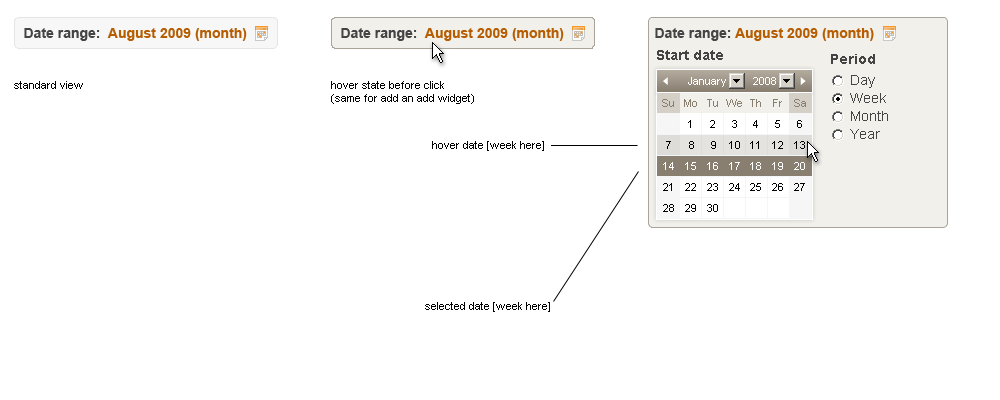
The calendar is a major usability issue in the current Piwik UI. In the dashboard mockups (see above), you can see that the calendar is now more visible. Also, the concept of Periods (day / week / month / year) is now directly integrated within the calendar selector itself, which makes more sense and makes it easier to use.

Here are the full set of icons used in the mockups, and a detailed example of how the footers work.

Your feedback!

Piwik is currently used by more than 40,000 users, all with different backgrounds and objectives. The User Interface must accommodate the needs of every user from the most basic through to the advanced.

What do you think about this proposal? What do you like, and what could be improved?

Your feedback is really important to us – please send us your comments and suggestions via the blog or the forum thread and we will gather your feedback and contributions over the next 10 days or so. We will then work with the designer to prepare the final version of the mockups, which will then be implemented.

Thank you!

About author
piwik team member

Matthieu Aubry

While studying in India in 2006, Matthieu had the idea of creating an open source web analytics alternative to Google Analytics. In 2007 he released the first public beta version of Piwik. Matthieu now leads the project from New Zealand, where he likes to spend his days coding new features from the Piwik Roadmap, and helping users and customers use Piwik effectively. Find him on twitter or github.

Like what you read?

Subscribe to our rss feed: Posts or you can Suggest a topic to write about in the blog or See list of Features

  1. Paul Bauer Says:

    March 1, 2011 8:08 pm

    Looks much better than the old one! Can’t wait to test it out!

  2. October 18, 2010 5:42 pm

    the theme looks good: professional and clear layout. Not too aggressive colors. Modern and technical. Goog job.

  3. October 4, 2010 8:31 am

    Danke sehr gut!

  4. SEO Utah Says:

    September 22, 2010 7:34 am

    Search engine optimization is complex at times, in particular when google makes a modification or perhaps propose that they might make a shift in their own algorithm.

  5. September 3, 2010 12:08 pm

    It looks great! The design ist very clear and straight.
    Great work!!!

  6. August 11, 2010 7:53 am

    Hi I was just checking If someone could help me out with this problem, I view this blog a fair bit but sometimes the background keeps messing up and I cant read the text. PLease help me out

  7. August 11, 2010 5:46 am

    Just updated to 0.9 from 0.8, and the date range selection is still broken on the Mac. I can only select an individual day, a single week, or a single month. No way to select a range of days, a range of weeks, or a range of months. If there is a way, I haven’t figured out how to do it. Same behavior with Safari 5.0.1 and Firefox 3.6.8. under Mac OS X 10.6.4. Also, in this form, the second field is invisible, and it evidently is the email field because when I left if blank the system said it was missing an email address.

  8. Sascha Says:

    July 22, 2010 3:20 pm

    Great job! Good, better … PIWIK! Keep on going!

  9. emp Says:

    July 22, 2010 7:45 am

    This looks great.

    One minor feature request:

    Would it be possible to lightly shade Saturday and Sunday on the calendar views?

  10. Susy Says:

    July 19, 2010 3:22 pm

    I think this is a really big improvement!! Congratulations, I’m looking forward to installing this when it becomes available.

  11. Matthieu Says:

    June 16, 2010 8:59 am

    Osama, yes we can definitely do better – if you know an alternative to the flash graphing package we use, feel free to let us know and contribute the code to make it happen. The main problem is the time investment into rewriting graphs, as the core team has many other tasks to focus on. But I agree ;)

  12. June 12, 2010 10:49 am

    The Design looks great!

    One more thing: is it possible to get a more detailed view of the visitor location instead of the general overview sorted by country?

  13. steve Says:

    June 11, 2010 10:38 am

    When its done? :)
    beta Link?

  14. Muzz Says:

    June 9, 2010 4:58 pm

    As a UI designer, the new interface looks great. Implement!

  15. ReneS Says:

    June 8, 2010 4:35 pm

    Looks very good. Very clean and modern.

  16. Blaise Says:

    June 5, 2010 2:45 pm

    This is good news and i’m waiting for it to come.

  17. xmRipper Says:

    June 5, 2010 1:23 pm

    Hello, I know it isn’t ready yet, but I want to use this UI even though it is in beta phase. Please give us download link :)

  18. June 3, 2010 11:56 am

    Congratulations to the new design. It gives Piwik a much more professional look and feel. We are looking forward to the implementation of this design in PIWIK.

    regards
    Tibor

  19. cray Says:

    June 3, 2010 7:50 am

    Would it be possible not to require the user the adobe flash player (for viewing the graphs)? http://www.highcharts.com/ looks good…

    Anyway great work!

  20. Sam Says:

    May 31, 2010 4:34 am

    This is definitely cool stuff! I’m glad you guys are working on this… was thinking of modifying the css but this GUI upgrade can do so much more =)

    I hope that the widgets can span through 2 – 3 columns or the user can switch between 1, 2 or 3 column views. Not a simple change I must say.

    When can we expect a beta download? =P

  21. Mike Eng Says:

    May 28, 2010 3:15 pm

    Looks good. One really small point for now: the font with the shifting baselines makes the digits under “feedburner statistics” hard to read. Also, the label for the “e-mail” field is missing for this comment form on Safari 4.0.4 / Mac OS 10.6.

  22. jec Says:

    May 28, 2010 11:01 am

    ich freu mich schon sehr!
    danke!

  23. John Says:

    May 23, 2010 11:49 pm

    Looks wonderful! I cannot wait to try it. :)

  24. name Says:

    May 21, 2010 12:25 am

    Perhaps a poll would be helpful, to see how many people care for e.g. usability/performance/featureXY…

    Me: Piwik looks awsome, but it’s using a lot of processing power. A high-traffic website would need a piwik cluster to handle all the callbacks :-\

  25. Holger Says:

    May 20, 2010 5:57 pm

    What I forgot to mention above, but it isn’t really a pure GUI issue:

    We do not only need a start date, but also a end date. Day, week, month is not flexible enough in my opinion. Custom data ranges would be very useful (e.g. you can choose the last 3, 6 or 12 months, or 2 weeks, or 3 days, or whatever you want)

  26. Johannes Says:

    May 20, 2010 7:27 am

    The layout looks much more professional. Good job!

    This have nothing to do with the new layout, but it would really be great if you implement canvas graphs (or another alternative) instead of flash!!!

  27. Juan Says:

    May 20, 2010 1:47 am

    Looks great, very professional. Greetings from Chile to the Piwik team!

  28. Harman Gill Says:

    May 19, 2010 8:53 pm

    This looks amazing. This interface looks a lot more presentable and easy to follow.

    Great work guys.

  29. Bill Says:

    May 19, 2010 7:43 pm

    Please be sure to test the layout to see what happens when viewers enlarge the type. Some of us have difficulty reading small print and light grey text (or other light colours) on a white background.

  30. May 19, 2010 6:09 pm

    Great. Be sure to enable easy and well documented CSS edits. Theme support would be great.

  31. Christoph Says:

    May 19, 2010 3:56 pm

    The new User Interface looks good. I don’t have time for a deeper review, but to me it looks much better and easier to use than the current UI. Please go on and realize it.

  32. Mike Southby Says:

    May 19, 2010 12:13 pm

    Hey Piwik devs, really liking the new design, much more fresh and up-to-date. Looking forward to seeing it packaged soon…

  33. Robert Says:

    May 19, 2010 11:40 am

    Looks much better than the old one! Can’t wait to test it out!

  34. Judicael Says:

    May 19, 2010 11:36 am

    The new one is better than the old one though. But with everything on a white background, it does not enhance the reading experience.

  35. Alinux Says:

    May 19, 2010 11:10 am

    Absolutely what we are looking for.
    Great job guys!

  36. Phyton2706 Says:

    May 19, 2010 11:04 am

    The new look is much better than the current one!
    I can`t wait for the new release!

  37. KKovacs Says:

    May 19, 2010 11:03 am

    Woot! Looks great, guys! Can’t wait to see it on our own servers!

  38. bee Says:

    May 19, 2010 10:52 am

    A real improvement!

    I’ve started tracking my website with etracker, and my favorite dashboard information is that I can see today’s AND yesterday’s visitors + PI. ‘Any chance to see both information at the piwik dashboard at the same time, as both information are valuable to me?

  39. Arvind Says:

    May 19, 2010 10:47 am

    This looks good and well organised.
    Great work guys.
    -
    Arvind
    Tech Executive

  40. Steffen Says:

    May 19, 2010 10:44 am

    This is a great new GUI!

  41. Patrick Says:

    May 19, 2010 10:39 am

    Finally; seriously it was long over due; the above design looks a lot more professional. I would also advise to change the logo; because frankly that is long overdue as well.

    While these things are not the most important (the application needs to do what it is supposed to do first) it is very important to grow the community; because LOOKS sell.

  42. May 19, 2010 10:37 am

    This looks *awesome*. I came here to tell you guys how you should do it, but this is just great. Can’t wait for a release!

  43. Liang Says:

    May 19, 2010 8:08 am

    Currently I found it took some seconds to show the widgets. So if you change it, please also make it a little quick.

  44. ConnyLo Says:

    May 18, 2010 8:37 pm

    Cool, wanna get this!

  45. GENiALi Says:

    May 18, 2010 7:38 pm

    Just cool.
    Where can I download the new interface? :-)

  46. May 18, 2010 5:26 pm

    @Panos: I think there is no reason for themes in a website analytics tool. Do you have one specific?

  47. Smepq Says:

    May 18, 2010 1:24 pm

    Take a look at this really good UI:

    http://www.collabtive.o-dyn.de/demo/index.php

    good example how the implemented tooltips for every symbol, how they made the dashboard and the other content boxes

    greetings, Smepq

  48. laurent Says:

    May 18, 2010 12:42 pm

    The updated design looks great. Only one comment – can the main color for text and lines be made configurable (with CSS or new settings) ? I find the switch to orange as the main color (instead of blue) makes it difficult to distinguish alerts from regular text.

  49. Panos Says:

    May 18, 2010 10:45 am

    It is great the new look.
    I would suggest to have themes support.

  50. May 18, 2010 10:14 am

    Great improvement, but maybe too close to Google Analytics.
    What would be even more important in my opinion is speed improvement and a possibility to save custom display options (graph type).

  51. Ben Says:

    May 18, 2010 8:32 am

    The redesign looks excellent. The one thing letting piwik down as a whole was the “dated” feel to the UI. That is a massive improvement! Good work. I can’t wait to see it in action.

  52. Thomas Bunte Says:

    May 18, 2010 7:32 am

    The new GUI looks more tidy and “user-friendly”.
    Great work!
    Only a small detail could be better: imho was the icon for export not 100% clear.

  53. Samalah Says:

    May 18, 2010 4:53 am

    I think this is a really big improvement!! Congratulations, I’m looking forward to installing this when it becomes available.

  54. robo47 Says:

    May 17, 2010 9:52 pm

    really looks great.

  55. Ahriman Says:

    May 17, 2010 9:46 pm

    Looks great :D

  56. Tim Says:

    May 17, 2010 9:46 pm

    Simply Fantastic. It’s now pleasing to look at now as well as the power of Piwik analytics on the backend. This is a much needed make-over.

    Job well done! I can’t wait for the update.

  57. Maksin Says:

    May 17, 2010 9:27 pm

    Cooool, this is what we have waiting for.

    Good. :)

  58. Hans Nordhaug Says:

    May 17, 2010 9:02 pm

    The new UI looks great. I don’t have time for a thorough review, but it definitely looks much better than the current UI.

    Greetings from Norway.

Leave a Reply

Post Comment