
UPDATE: Check out the new Goal Tracking in Matomo documentation.
Guest Blogger Marc Lindsay Is An Internet Marketer & Runs An SEO Company LTSEO
Conversion tracking is the main scoreboard for any web campaign. If you are serious with what you are doing, setting up goals is a required step for reporting on how your traffic affects the bottom-line.
Conversions follow the 80/20 principle. This principle suggests that roughly 20% of your traffic brings 80% of the earnings. This moves way beyond simple tracking tools where your measured traffic goes in and out of your website without any meaningful impact. Brand, exposure, and activity are all key components of an effective website, but conversion is where all the money is.
The measure of website’s success is getting quality traffic from users that do what you want them to do. In order for anything to be “converted”, users must be able to complete a concrete action within your website. Thus, the game lies on optimizing your website to make that theoretical 20% work effectively for you.
Using Matomo (Piwik) Goal Tracking
Goal tracking is a Matomo Plugin in its early stages of development. While there will be much more features in store for future releases, the basic functionality is more than enough to track simple conversions in your website.
Click the Goals located in the main navigation. This will bring you to the overview page where your goals are listed

To start with a new conversion filter, click ‘add a new goal’. This will bring you to the goal setup. Fill in your Goal Name (make it descriptive… and inspiring) then click one of the Goal triggers.
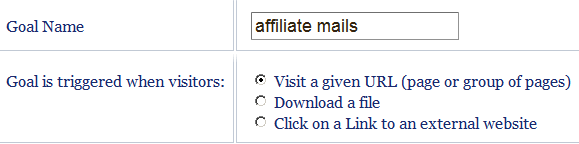
In this setup, a goal is accomplished when users visit a given URL, clicks on a link to an external website, or downloads a file.

You can track external links with your affiliate id, visitors that go to your landing page or just about any action on your website. For advanced uses, you can also trigger a goal conversion using the Javascript trackGoal method (see Javascript API documentation).
Finally, add a dollar value to your goal. This value can either be a true monetary value (i.e. based off direct sales) or an arbitrary value to simply let you know how your site is doing. For example, a visitor submitting an inquiry in the contact form could mean $1 for your business. This will fine-tune the goals that you want to set and let you know what the real score is.

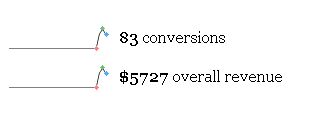
Below is a real goal using the exact methods above that was tracked on http://www.theimalliance.com
Also a very welcome and nice touch is the ability to instantly segment right from your main dashboard without even having to go into the goals section.
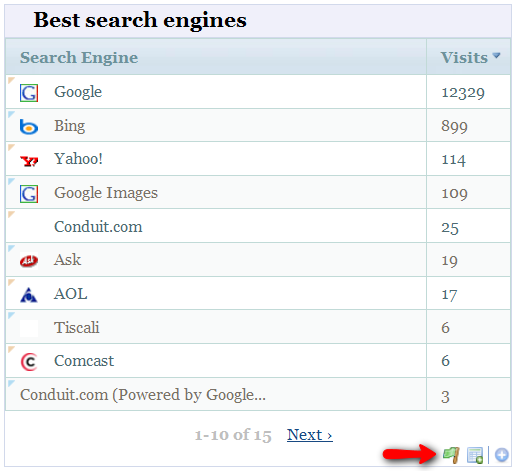
Click on that little green flag and instantly you can see the conversion statistics by source, and on many of the other widgets (including by keyword and as said, many other types).
This was a tracking based on members signing into various services or affiliate programs, using goal tracking to track.
We also used to track outgoing link clicks and optimize heavily on what was getting the largest click outs each month as you know its a hot topic then.
The above is for a period of 2.5 months (June to Aug 15th)
Even in its early stages, people can get a lot of benefits with Matomo Goal tracking
Stronger Guidance in Optimizing your Website – Once you get ample flow of traffic, your next job is to capture the profitable segment from the mass traffic. By analyzing the behavior of users that gets conversions, you can further optimize your website for better conversion rates.
Your Data is your OWN – What you have is all yours. No one can take a snoop without your permission. This is the one reason why more enterprises are turning to Matomo for self-hosted analytics solution. If you want to build the umbrella of trust with your clients, then this is a good first step to show that you are serious in keeping their data safe.
Create Custom Reports easily – With the embedding feature and open API, you can create custom conversion reports for yourself and your clients without having to go through hoops. You do not need any more formatting done compared to what Matomo gives you.
There’s an app for that! – When it comes to nitty-gritty tracking where the client demands the most accurate reporting, Matomo makes it easy with custom applications. For example, you can create a custom Adobe Air app with real-time tracking for your clients so that they can view analytics from their desktop.
In addition, you do not have to depend on third-party providers to deliver these features to you. Instead, you can go in and change the code as it fits you. This works well for developers running a tight shop and rely on full integration between their products/goals.
Real-time tracking – Matomo goal tracking happens in real time, so once a visitor acts one on of your goals, the data is added to your dashboard.
More features will be introduced to this plug-in as it develops. Features in-line includes:
- conversion table display by search engine, country, keyword, campaign, etc. in the Goal overview report
- widgets support in the main dashboard
- deeper time structure in reporting conversions
- and many more.
Get into it and start tracking goals. Matomo is only getting better.
Cheers
Marc Lindsay


