November '08

05

Posted by

in Community, Development

Comments: 28 Comments

New version of Piwik! Why you should upgrade

Today we are happy to release a new version of Piwik: 0.2.17. It includes more than 30 bug fixes and new features. See an online demo or Download the new version today!.
The main changes are:

  • more than 30 bug fixes (we fixed most of the open bugs!)
  • you can publish your stats in widgets (embedded in iframe) for all existing widgets. Click on the widget link on the top of the screen (example of such a widget below)
  • you can now select the language from the User Interface
  • … and choose between 12 available languages: English, Deutsch, Español, Français, Italiano, 日本語 (japanese), Nederlands, Polski, Português, Русский (Russian), and Українська (Ukrainian).
    If you want to translate Piwik into your language or contribute to an existing translations, please contact Noah (our awesome translation coordinator) on translations (at) piwik.org
  • Piwik now detects Google Chrome
  • … and looks nice in Chrome/Safari
  • the Installer will now create the MySQL DB for you
  • and we’ve introduced an Upgrade mechanism, so you can now easily upgrade from any version to the very latest that’s available.

Most of these changes were already available in SVN and beta testers were enjoying them for a while, but we wanted to wait to finalize the Upgrade mechanism before releasing it publicly (so you can all upgrade easily).

How can I show widgets of my Piwik web analytics reports?
Just click on “Widgetize” on the top of your Piwik (or here for a demo) and simply preview the available widgets! Here is the widget that lists your unique visitors by country:

Note: for your reports to be publicly available you have to give anonymous users the right to view your reports (in Admin > Users).

How do I upgrade Piwik?

To upgrade Piwik, simply download the latest available version. Extract the .zip, upload the new Piwik files by overwriting your existing Piwik files and making sure your config/config.ini.php stays unchanged (it should by default). Go to yourwebsite.com/your/piwik/ and click on continue. You’re done! :)

How do I know which version of Piwik I’m using?

If you look in the HTML source of Piwik you’ll see a META tag with the version number:

<meta name="generator" content="Piwik 0.2.16" />

If you can’t see this tag then you are using Piwik <= 0.2.9. If this is the case, we strongly recommend that you update to the latest version (download).

How do I know when new versions are released?

Subscribe to the Changelog page RSS feed. You can also suscribe to the blog (by rss or email – see the sidebar of this blog), or to register to the piwik-hackers mailing list (more info on the developer section). We will be adding an update check mechanism in Piwik so that you are notified when new versions of Piwik are published directly in the Piwik UI.

What’s coming next?

We are aiming to fix more open bugs in the next releases and introduce an Update check in the UI so that you are notified when new versions are published. We are also working on a couple of other exciting new features (stay tuned on the blog for more details!).

Screenshot of the current release:
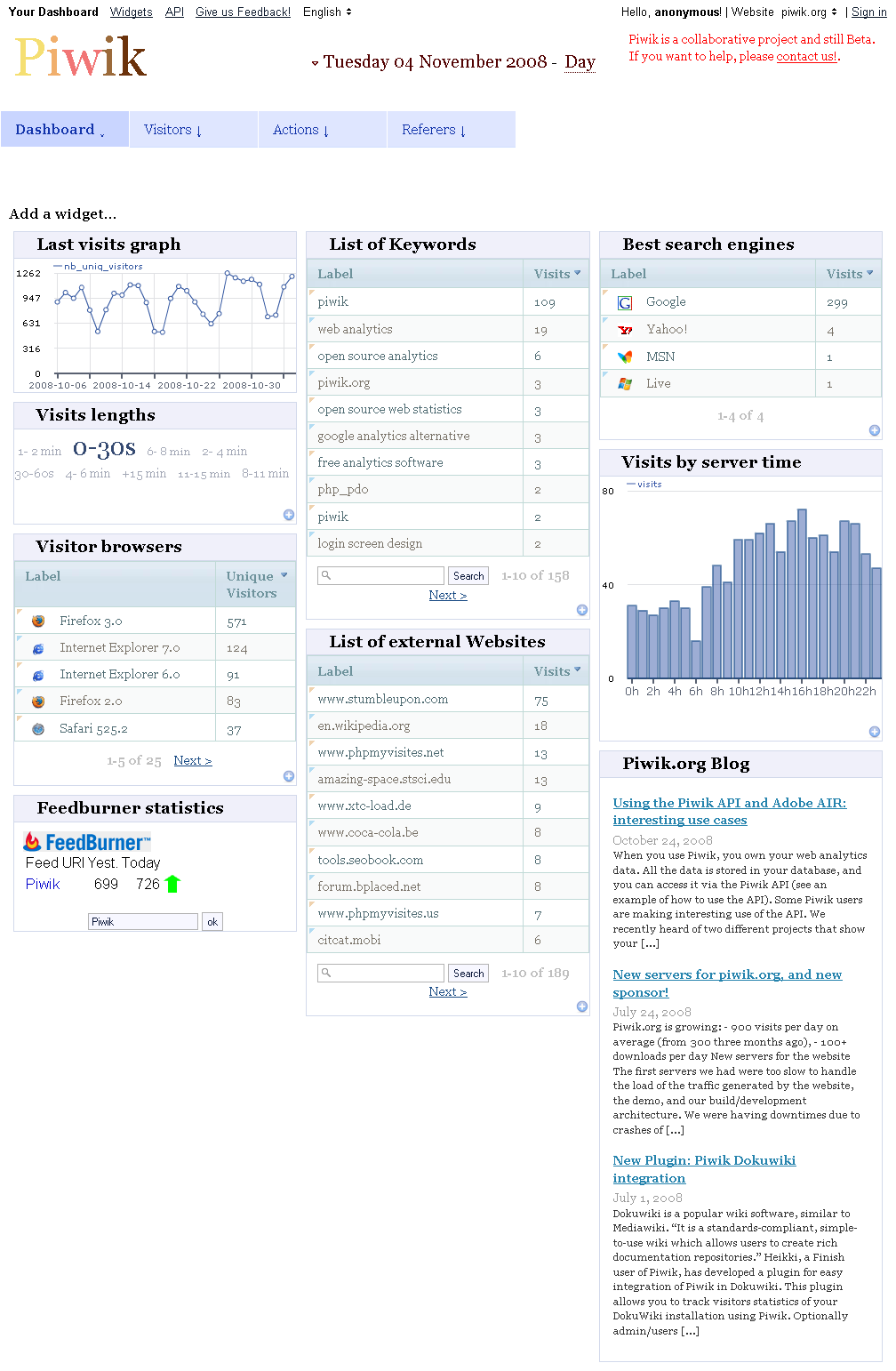
For any feedback, suggestion or messages of love, please contact us at hello@piwik.org

About author
piwik team member

Matthieu Aubry

While studying in India in 2006, Matthieu had the idea of creating an open source web analytics alternative to Google Analytics. In 2007 he released the first public beta version of Piwik. Matthieu now leads the project from New Zealand, where he likes to spend his days coding new features from the Piwik Roadmap, and helping users and customers use Piwik effectively. Find him on twitter or github.

Like what you read?

Subscribe to our rss feed: Posts or you can Suggest a topic to write about in the blog or See list of Features

  1. November 13, 2009 8:52 pm

    Die einzelnen Webseiten zu analysieren ist recht interessant und eine Herausforderung.

  2. Andrew Says:

    November 6, 2009 7:30 pm

    The software seems to have installed fine, but the update fails from the site. When I click on the “please update now” lonk I get a 404 error.

    “You don’t have permission to access /piwik/misc/redirectToUrl.php on this server”

    Any help would be greatly appreciated.

    AJ

  3. libertybn Says:

    August 7, 2009 10:58 pm

    Notice: Undefined index: debugTrackVisitsInsidePiwikUI in ___/templates_c
    I have just installed.
    So I cannot say if aything is harmed by this error.

  4. Elmar Weber Says:

    July 28, 2009 4:13 pm

    Same problem here, did a fresh install and just replaced the config file.

  5. Alain Says:

    July 28, 2009 11:28 am

    Same on my Server:
    Upgrading from 0.4.1 to 0.4.2 I get thi error in Addministration

    Notice: Undefined index: debugTrackVisitsInsidePiwikUI in /var/www/piwik/tmp/templates_c/%%1D^1D5^1D598A14%%piwik_tag.tpl.php on line 3

  6. July 26, 2009 2:01 am

    Upgrading from 0.4.1 to 0.4.2 I get this error in Administration –
    Notice: Undefined index: debugTrackVisitsInsidePiwikUI in /var/www/piwik/tmp/templates_c/%%1D^1D5^1D598A14%%piwik_tag.tpl.php on line 3
    Backtrace –> (do you need full Backtrace?)

    Any Ideas?

  7. Simone Says:

    July 24, 2009 3:21 pm

    Upgrading from 0.4.1 to 0.4.2 I get thi error in Addministration

    Notice: Undefined index: debugTrackVisitsInsidePiwikUI in /var/www/piwik/tmp/templates_c/%%1D^1D5^1D598A14%%piwik_tag.tpl.php on line 3

    Backtrace –> (do you need full Backtrace?)

  8. Valdas Says:

    May 12, 2009 6:43 pm

    after upgrade and before going to piwik via broser one should clear tmp/templates_c directory.

  9. psv Says:

    April 2, 2009 12:52 pm

    it is not so easy to upgrade the first edition by uploading and overwriting the files only. there are some files missing yet. i got a lot of errors.

  10. Robert Says:

    March 12, 2009 2:09 pm

    Piwik ist eine Super Alternative zum GA, auf alle Fälle eine Empfehlung wert.

  11. chris Says:

    February 20, 2009 2:39 pm

    looks great. but I miss an option to show the last N Visitors with Details about them??!

  12. Scott Says:

    February 16, 2009 3:19 am

    I look forward to migrating to Piwik as soon as possible… Just wanting on http://dev.piwik.org/trac/ticket/70 to be released.

  13. Directory Says:

    February 5, 2009 5:19 pm

    Very informative article, which I found quite useful. Cheers ,Jay

  14. EnjoySilk Says:

    January 9, 2009 2:12 pm

    Another thing I need: A more detailed information about the visitors: IP address, detailed actions/clicks within my site etc. last visit date

  15. Matthieu Says:

    November 17, 2008 12:11 am

    Thomas, if you have the “syntax error” problem when creating the tables, please replace line 605 in core/Piwik.php
    with
    ‘option’ => “CREATE TABLE `{$prefixTables}option` (
    (add the simple quotes)
    this should work better.
    We will publish a new release to fix the issue early this week.

  16. Halva Says:

    November 13, 2008 8:26 pm

    updated from 2.16 to 2.18 – works fine here…

  17. Matthieu Says:

    November 13, 2008 5:28 pm

    Markus, for your error please refresh your browser cache. Once you pickup the last version of the javascript files, this should be fine!

  18. Francesco Says:

    November 11, 2008 10:36 am

    i have uploaded the new package over the 0.2.17 piwiki version and I get this error

    Fatal error: Cannot redeclare class Piwik_Form in /home/noisecol/public_html/piwik/modules/Form.php on line 90

    only config file still unchanged.

  19. Puh Says:

    November 10, 2008 7:09 pm

    After I follow the steps in the FAQ I got many yellow WARNING! Boxes and now PIWIK seems full failed

    Nothing works – all Error Messages:

    Warning: file_put_contents(config/config.ini.php) [function.file-put-contents]: failed to open stream: Permission denied in /…./piwik/core/Config.php on line 141
    -
    Backtrace –>
    #0 Piwik_ErrorHandler(2, file_put_contents(config/config.ini.php) [function.file-put-contents]: failed to open stream: Permission denied, /…./piwik/core/Config.php, 141, Array ([configFile] => ; DO NOT REMOVE THIS LINE
    ; file automatically generated during the piwik installation process (and updated later by some other plugins)

  20. Markus Says:

    November 10, 2008 6:15 pm

    Hi,
    I also had the error that is described in your faq. Now it works, but I can’t change time/date, I only see the stats for the last day. The text “Sunday 09 November 2008 – Day” isn’t clickable anymore. I tested it with Windows (Firefox) and Mac OS (Safari).

  21. Thomas Says:

    November 10, 2008 11:07 am

    Hi!
    First I’ve got the error that’s described in your faq (Translation string…). I deleted the lines in config.ini and the directories and it seemed to work. But now I’m in a loop. If I go to index.php, I get the message, that I have to upgrade my database. Ok, I do so and click the upgrade button and get the message “Piwik has been successfully upgraded!”. But if I click on “continue”, I get the “upgrade required” message again. What can I do to get out of the loop?

  22. Matthieu Says:

    November 9, 2008 11:56 am

    ac, not yet but we will work on a plugin that lets you import most of your historical data from phpmyvisites to piwik.

    judas, piwik should work normally on subdomains. Make sure you have inserted the code in your subdomain pages and data should appear in your Piwik reports.

  23. ac Says:

    November 7, 2008 10:59 pm

    Great news!

    It is possible migrate from phpmyvisites to the new piwik 0.2.17?

  24. Matthieu Says:

    November 7, 2008 9:23 pm

    Ralph, please let us know the error you encountered during the upgrade. No error should force you to lose your data.
    For a list of solutions to common errors (that should impact a very small number of users – only the early Piwik users) please see http://piwik.org/faq/

  25. Isb1009 Says:

    November 7, 2008 3:25 pm

    You haven’t mentioned the Catalan language…

    FYI, I’m going to check the MediaWiki plugin to improve the code and other options.

  26. ralphs Says:

    November 7, 2008 11:52 am

    The upgrade failed. I must piwik completty reinstall, all data was lost.

  27. j0k3r Says:

    November 5, 2008 9:59 pm

    Really great news !
    I’m just really really waiting for this ticket : http://dev.piwik.org/trac/ticket/70

Leave a Reply

Post Comment